 Tebing
How to Play Tebing
Everything you need to reach the top: controls, hand and foot technique, natural hazards, the level list, and every game mode.
1. Goal of the game
Climb from the starting ledge to the summit, where a yellow flag is waiting. Every level has a few checkpoints: ledges with an anchor station. If you fall, you are lowered to the last checkpoint you passed. The fewer falls, the more stars you earn.
2. Controls
| Action | Phone | Computer |
|---|---|---|
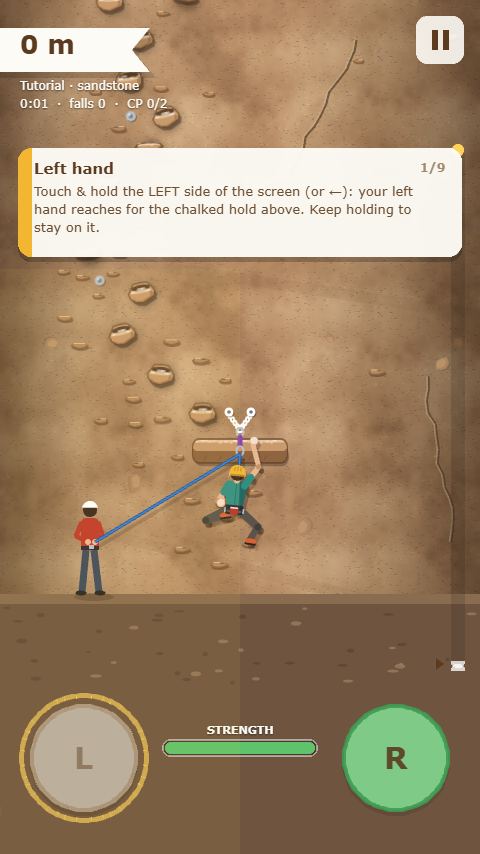
| Left hand | touch & hold the left half of the screen | ← or A |
| Right hand | touch & hold the right half of the screen | → or D |
| Restart from checkpoint | pause button → menu | R |
| Pause | ⏸ button, top right | Esc / P |
| Pull a rival (versus) | PULL button | Space, S, or ↓ |
| Speed mode | ⚡ Speed button in the menu | S in the menu |
| Co-op (one rope together) | 🤝 Co-op button in the menu | C in the menu |
| Wall editor | 🧱 button in the menu | B in the menu |
| Sound | 🔊 button in the menu | M |
| Settings (language, vibration, etc.) | ⚙ button in the menu | ⚙ button in the menu |
In the menu, a computer can also use Enter or Space to climb the next cliff, 1–9 and 0 to replay an unlocked level, ↑ ↓ to scroll the cliff list, H for the daily challenge, S for Speed mode, T for Endless, C for co-op, V for versus, I for missions, and G for style.
New player? The first time you open Level 1, a short tutorial (about 1 minute) comes first. It teaches reaching, climbing, matching, the two-hand jump, the dyno, and the rope one step at a time, and each lesson completes as soon as you do it. You can replay the tutorial any time from ⚙ Settings or the How to play panel.
3. Hands: reaching, holding, lock-offs
- Hold a hand's button: that hand reaches for the nearest chalked hold and grips it as soon as it touches. Higher holds always come first.
- Release the button: that hand lets go of its hold.
- While one hand reaches, the hand that is holding does a lock-off: it pulls your body up until that hand is at shoulder height. That's why fairly distant holds are still within reach.
- With both hands holding, your arms straighten again to save strength.
The basic climbing pattern: hold both buttons, release the lower hand, then hold it again so that hand reaches for the next hold. Repeat, alternating hands.
4. No crossing hands & matching
Like a climber keeping their body stable, hands in Tebing can't cross. While the left hand is holding, the right hand can't take a hold to the left of the left hand, and vice versa. A hold almost directly above the other hand is still allowed.
So what if the route turns left while your right hand is the free one? The right hand automatically matches: it grabs the same hold as the left hand. Once both hands share a hold, release the left hand, then hold it again so it reaches for the next hold on the left.
- Left hand on hold A, right hand on hold B, lower and to the right.
- The next hold is up and to the left of A. Release and hold the right hand: it matches on A.
- Release and hold the left hand: it reaches for the hold up and to the left.
Small holds fit two hands at once. On wide ledges, the hand simply slides to the correct side.
5. Dynos & two-hand jumps
A dyno is a jump to a hold that is too far for a normal reach. How: keep the reaching hand held until the other hand has finished its lock-off (your body is pulled all the way up), then release the pulling hand. Your body launches toward the target hold and the reaching hand snatches it. Planted feet push too, so the jump goes further. Avoid dynos while the wind is blowing.
Two-hand jump: when both hands hold the same hold (after a match, or on a ledge), release both buttons at the same time. The climber jumps straight up about 1.3 meters. Hold a button again at the top of the jump to catch a hold above you. If the buttons aren't released together, the climber just lets go.
6. Feet & arm strength
Your feet move automatically: they find small edges in the rock or holds you have passed, then carry your weight. You only need to watch the STRENGTH bar at the bottom of the screen.
- Strength drains when your arms carry your weight alone: hanging without footholds, holding with one hand, or locking off too long.
- Strength recovers with two hands holding and feet planted, and much faster on ledges (checkpoints and resting ledges).
- If strength runs out, your hands let go. A bar flashing red means you should find a resting position soon.
7. Hold types
| Hold | Looks like | Strength |
|---|---|---|
| Jug | a big bump with a deep pocket | cheapest |
| a hole in the rock that fingers fit into | normal | |
| Edge | a thin, long lip of rock | a little costly |
| Sloper | a rounded dome with no sharp edge | most costly |
| Crumbly flake | reddish cracked rock | breaks about 1 second after you grab it, grows back after 6 seconds |
| Slippery rock | shiny, with no chalk marks | your hand slips off after about 1.3 seconds |
| Moving hold | a thin groove underneath it | wait for the right moment |
| Iron rung | via ferrata rungs with a steel cable (Mount Parang) | solid, as easy as a jug |
| Ledge | a wide place to stand | a resting spot, strength recovers fast |
8. Rope, checkpoints & falling
Tebing uses lead climbing. There is a safety bolt about every 3 meters, and the rope clips automatically to each bolt you pass. When you fall, that last bolt catches you. The fall is roughly twice your distance above the bolt, plus slack and rope stretch, just like a real lead fall.
After hanging on the rope for a moment, the belayer lowers you to the last checkpoint. In solo mode you are sometimes offered to continue from where you fell. Press R or choose "Restart from checkpoint" in the pause menu to go back to the checkpoint at any time.
💀 No rope. The 💀 No rope button under the menu title turns the regular levels (Levels 1–14) into climbs with no rope and no checkpoints. Nothing catches you: as soon as you fall, you are back at the bottom and the clock keeps running. No-rope records are kept separately (level cards show 💀 and the time), and finishing one level this way unlocks the No Rope badge. Made for players who want the hardest challenge, or for livestreams.
9. Natural hazards
Wind
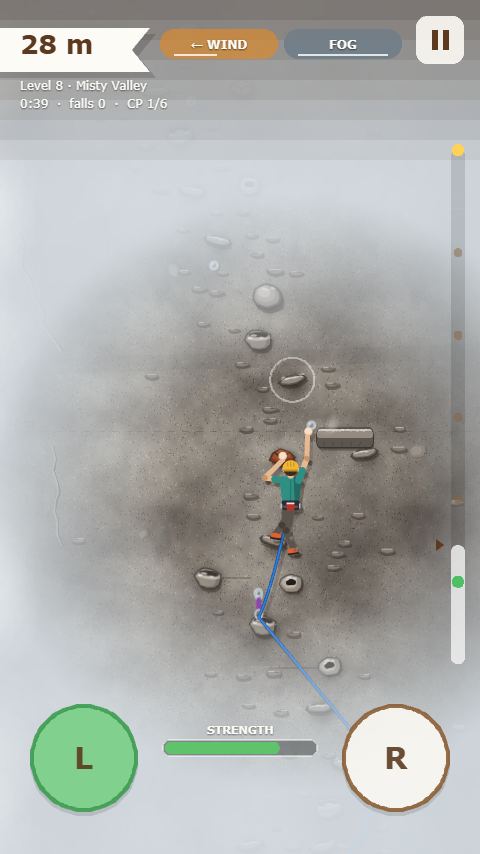
The WIND sign at the top of the screen blinks and you hear a gust just before it arrives. While it blows, your body is pushed sideways. It is most dangerous when you hang without feet or during a dyno, so wait for the wind to calm down before you jump.
Falling rock & ice
Small pebbles trickle down and a red ! appears at the top of the screen with the line it will fall down, then a boulder (or a chunk of ice on snowy cliffs) follows. Reach sideways to dodge. If it hits, your helmet protects you, but your arms lose 30% strength.
Rain
The sky darkens and thunder rumbles before the rain (weather sign: CLOUDY, then RAIN). Wet holds drain strength 1.6–1.8 times faster and only dry a few seconds after the rain stops. Shelter in a resting position or on a ledge.
Fog
When thick fog rolls in, your view shrinks to a small circle around the climber. The nearest holds stay visible, but the route above is hidden. Memorize your route while you can still see.
Wasp nests
In Endless mode and on Level 14 (Harau Valley), wasp nests hang beside the route with wasps buzzing around them. Grabbing a hold near a nest makes the wasps attack: your arms lose 25% strength. After stinging, the nest calms down for a few seconds. If you have a choice, take holds away from the nest.
Rock roofs
Parts of the cliff that stick out, marked by a dark shadow, a rock lip across the wall, and a dark band on the height bar. Under a roof your feet get no footholds, so your arms carry all your weight. The holds are big and reachable without dynos. Recover fully on the ledge before the roof, then get through without stopping.
10. Levels & Indonesian Crags
| Level | Height | Rock | Challenge |
|---|---|---|---|
| 1. Sand Hill | 45 m | sandstone | warm-up: big holds, short moves |
| 2. Red Tower | 75 m | red sandstone | crumbly flakes, slippery rock, moving holds |
| 3. Limestone Wall | 85 m | limestone | wind, lots of slopers & pockets, resting ledges |
| 4. Granite Crack | 95 m | granite | falling rock, thin edges |
| 5. Sunset Peak | 110 m | sunset sandstone | wind and falling rock together |
| 6. Basalt Columns | 115 m | basalt | two rock roofs with no footholds |
| 7. Rainy Karst | 120 m | tropical karst | rain, slippery rock, one rock roof |
| 8. Misty Valley | 125 m | andesite | fog, valley wind, moving holds |
| 9. Frozen Wall | 135 m | snowy granite | falling ice, strong wind, slippery rock, a rock roof |
| 10. Roof of the World | 150 m | granite, dawn sky | every hazard at once, the longest route |
The climbing trail. Levels unlock one at a time. The menu shows a big next cliff card with a ▶ CLIMB button, and below it the list of cliffs you have conquered, with their stars and best times. Tap one to replay it, and scroll the list once it gets long. Cliffs you have not reached yet stay hidden, so every summit reveals a new surprise.
Indonesian Crags (Levels 11–14) come right after Level 10. All four are inspired by real climbing crags in Indonesia, each with its own rock, sky, and hazards. You can read about the real crags in the Indonesian Crags articles.
| Level | Height | Rock | Challenge |
|---|---|---|---|
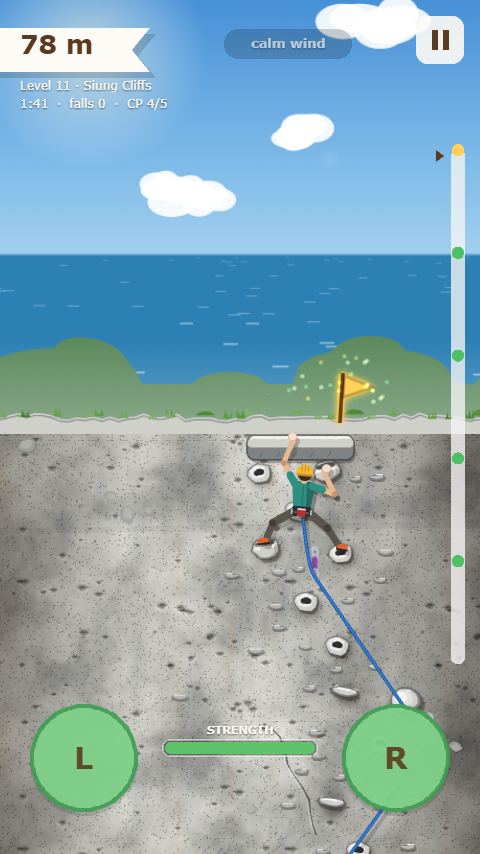
| 11. Siung Cliffs | 80 m | reef limestone, sea view | sea wind, lots of pockets, slippery rock |
| 12. Citatah 125 | 125 m | cream limestone | loose falling rock, one rock roof |
| 13. Mount Parang | 140 m | dark andesite | strong wind, fog, via ferrata iron rungs |
| 14. Harau Valley | 150 m | mossy reddish rock, waterfall | tropical rain, wasp nests, slippery rock |
Stars: reach the top without falling = 3 stars, 1–3 falls = 2 stars, more than that = 1 star. Your total stars across all levels unlock style options.
11. Daily challenge
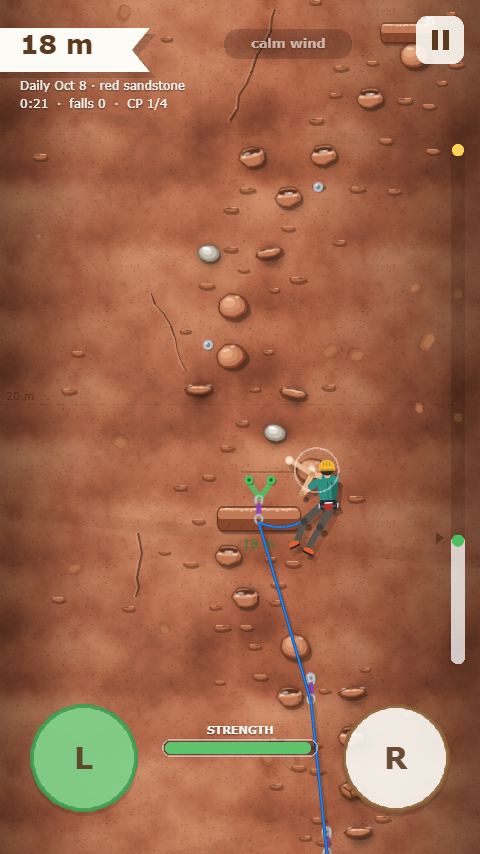
The Daily button in the menu opens a new route every day. The route is generated from the date, so every player gets the same cliff on the same day. It is 50–75 m tall, with one or two natural hazards. You can replay it to improve your time.
Each time you finish today's route, your streak 🔥 grows. Miss a day and it starts again from one. When you finish, tap ⚔ Challenge a friend so your friends can climb the same route against your ghost (see Challenge a friend). Your best time also enters that day's world ranking.
Want a reminder? Tap 🔔 Remind me tomorrow on the finish screen (or Settings → Notifications): your phone gets a notification when the new route is out, around the time you pick. If you've already climbed that day's route, that day's reminder is skipped.
12. Endless & high scores
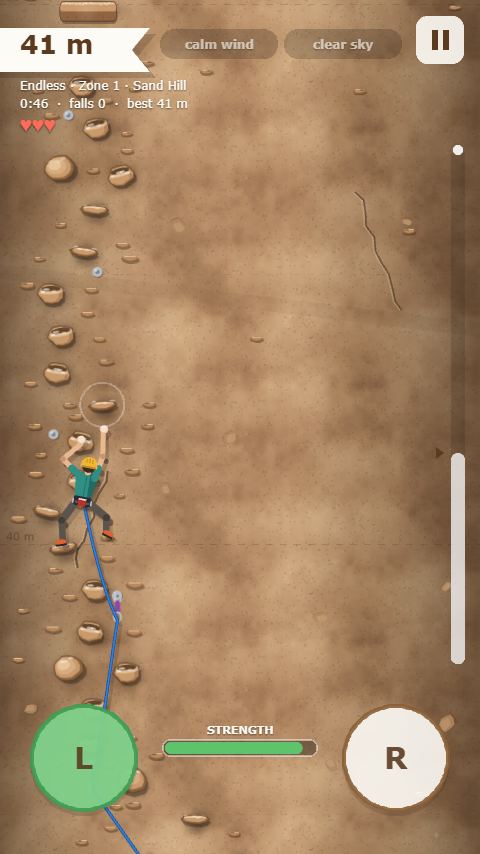
Tap the ∞ Endless button at the bottom of the menu, then tap Start climbing. The cliff has no top: the wall keeps building as you climb, and every run uses a brand-new random cliff.
- Zones: every 100 meters the rock type changes (sandstone, red sandstone, limestone, granite, and so on) and the cliff gets harder. A big ledge marks the start of each new zone, and there are resting ledges every 25 meters.
- Hazards: the first zone is clean. From the second zone one hazard appears, then two or three at once in higher zones: wind, falling rock or ice, rain, fog, rock roofs, and wasp nests.
- Lives: you have 3 lives (♥ at the top left). Every fall, including one the rope catches, costs a life. If you grab the wall again, keep going; if not, you continue from your last safe hold. There are no checkpoints to go back to.
- Score: the highest point you reach. When you run out of lives, or choose End & see scores in the pause menu, the score is saved to a top 10 list on your device, with its time and date. The list appears in the Endless tab and on the results screen.
- Weekly world ranking: your best height this week is also compared with other players (🏆 World button).
Tip: recover on a resting ledge before entering a new zone, and watch the hazard list that appears when you reach the top of a zone.
13. Speed mode
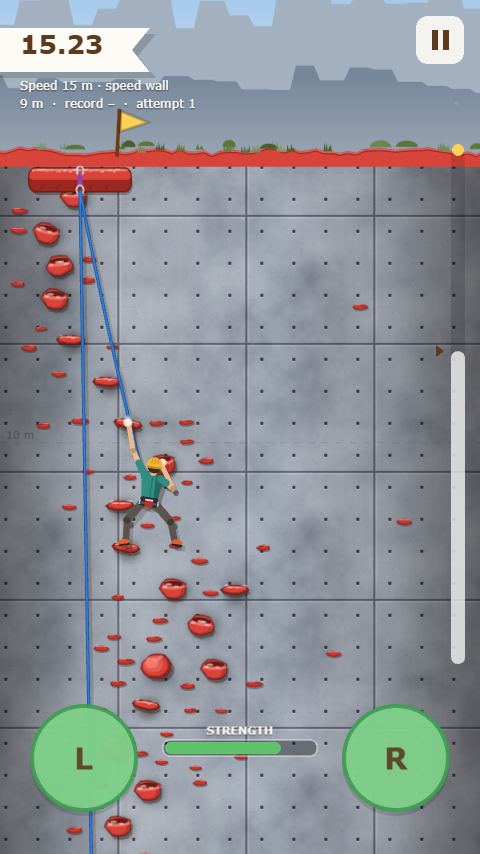
The ⚡ Speed button in the menu (or S on a computer) opens Speed mode: a fixed 15 m route that is the same every time, like a speed climbing competition wall. Wait for three beeps, then CLIMB! The clock only starts after the last beep and records your time to the hundredth of a second.
- You're protected by a rope from above. A fall is a failed attempt: you start again from the bottom right away with three new beeps, with no ads and no checkpoints.
- Because the route never changes, learn the fastest sequence of moves. Alternative holds sometimes offer a shortcut.
- Your fastest run appears as your best-run ghost on the next attempts, and your time enters this week's Speed world ranking.
- Tap ⚔ Challenge a friend on the results screen so a friend can race your ghost on the same route.
More about the sport: Speed Climbing: The Fastest Discipline in Climbing.
14. Versus
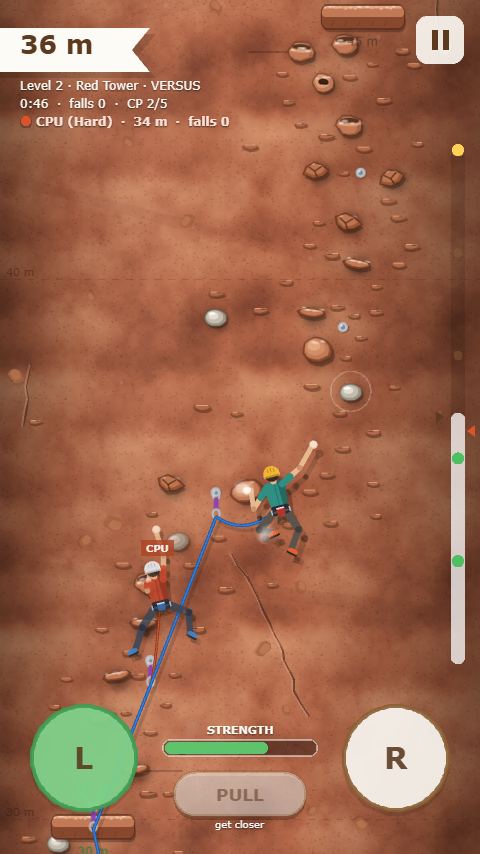
- Vs the computer: choose a level and a difficulty. The computer climbs with the same physics as you: it can run out of strength, fall, and wait for the wind to calm down.
- Vs friends online: one player taps Create room and shares the four-digit code or an invite link. Friends choose Join room, or just tap the link. A room holds up to 10 players. The host picks the level and starts the race.
- Pulling a rival: when you and a rival are both on the wall and close enough (about 1.8 m), the PULL button lights up. Pulling makes the rival let go and fall, but it costs 20% of your strength and has a 5-second cooldown.
Online races can't be paused. A race closes once the top three reach the summit (with 2 players: as soon as there's a winner; with 3 players: the top two), when everyone has finished, or at the latest 60 seconds after the first player finishes. Versus mode needs internet.
15. Co-op: one rope together
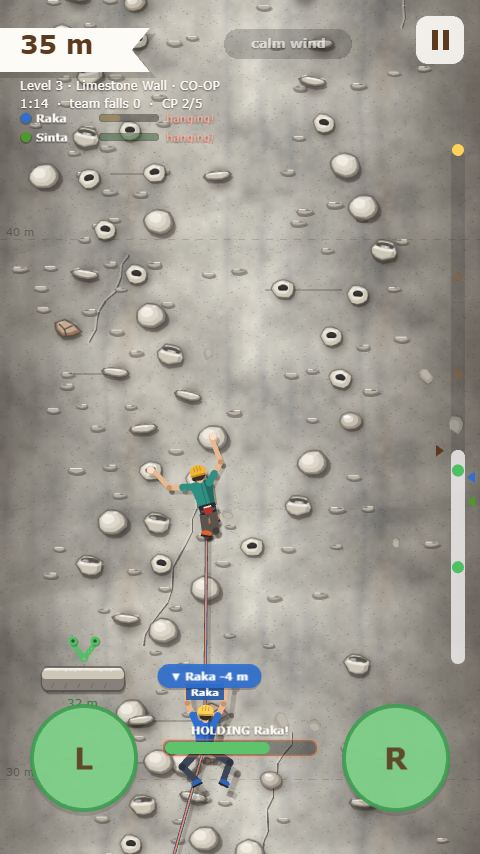
In Co-op mode (the 🤝 button in the menu), 2–4 climbers are tied one after another on a single rope and climb to the top together. There's no belayer: you protect each other.
- With the computer: pick a level and how many teammates (1–3). Works without internet and can be paused.
- With friends online: create a room or join with the four-digit code / invite link, up to 4 players on one rope. The host picks the level and starts. Online co-op can't be paused.
- A 4 m rope links each climber to their neighbors. Holds too far from the teammate at the other end of your rope can't be reached, so whoever is ahead has to wait for the others to catch up.
- Falls are held by your team: whoever falls hangs on the rope, and a teammate holding the wall catches them. While holding, the holder's arm strength doesn't recover and keeps draining under the extra weight, until the fallen climber grabs the wall again. Holding with your feet on the rock or from a ledge is easier. If the holder runs out of strength, they fall too.
- Rest on the rope: while hanging, your arms recover. Out of strength? Wait a moment, then grab the wall again.
- Climb over a teammate: the harness of a teammate who is holding the wall can be grabbed like a hold when the rock nearby is too far. They carry your weight too.
- Team fall: if everyone lets go of the wall, or someone falls too far, the whole team returns to the last checkpoint anyone reached.
- Summit together: whoever gets there first waits at the top, anchored so their strength doesn't drain even while holding a teammate. The team finishes when everyone is at the top, and the fastest team time on each level is saved.
Co-op walls have more holds spread across the whole width of the cliff, with several routes that meet at each checkpoint, so every climber can choose their own way up.
16. Seasonal events
A few times a year there is an event with a special route you can only play while the event runs. A week before it starts, an event pill appears under the menu title. Tap it (or press E on PC) to see the dates, rules, and rewards. Each event has two medals: a summit medal for reaching the top of the event route, and a gold medal with a special condition. Medals unlock Style items that you keep after the event ends (the 🎁 Event tab in Style).
- 🎆 New Year's Eve (December 20 – January 5): climb at night with a headlamp, so only the holds near you are visible. Fireworks light up the whole wall for a moment now and then: look and remember the route. Gold: reach the top without falling. Rewards: the Fireworks rope and the Midnight helmet.
- 🌙 Ramadan Sunset (ngabuburit) (the month of Ramadan, roughly February 7 – March 14, 2027): a clock at the top of the screen runs toward sunset while you climb, and the sky turns orange. Reach the top before the sunset drum sounds for the gold medal. Rewards: the Eid green shirt and the Crescent helmet.
- 🎊 Greased Pole (panjat pinang) (August 10–24): Indonesia's Independence Day contest on an oiled areca pole, with no rope. Your hands slide if you hold an oily part too long, and your feet can only grip parts that are almost clean. Every part you grab gets cleaner and the oil slowly dries, so keep trying until you reach the prizes at the top. Play it solo, race the computer or friends in an online room (your rival climbs the pole next to yours), or in one-rope co-op (catch each other like a human pyramid). Gold: win a race. Rewards: the Red-white shirt and helmet.
17. Style
In the Style menu you can change the color of your helmet, shirt, and rope. Locked items can be previewed first. Items unlock by collecting stars in solo levels, with daily challenge streaks, by completing daily missions 🎯, or by reaching certain heights in Endless mode. Some items marked ▶ can also be unlocked sooner by watching a rewarded ad.
18. Daily missions & badges
The Missions button in the menu shows three new missions every day, the same for all players, for example "Reach 3 checkpoints", "Match 8 times", or "Reach 100 m in Endless". Progress grows by itself while you play any mode. Missions that need a specific mode have a ▶ Play button that takes you straight there. Every completed mission counts toward unlocking Style items marked 🎯.
Badges are lasting achievements, such as First Steps (top of Level 1), Dedicated (a 7-day daily streak), Above the Clouds (500 m in Endless), or Online Champion. There are 20 badges, including Archipelago Explorer for finishing all four Indonesian Crags and One Rope for reaching the top with a co-op team. Tap a badge to see what it needs and how far along you are.
19. Best-run ghost
Every time you set a time record on a level (or on today's daily challenge), your climb is recorded. When you try again, the recording appears as a pale climber with a gold helmet labeled Your best, and a line at the top left shows how far ahead or behind you are. Chase your ghost to beat your own record. You can turn the ghost off in Settings or with the 👻 button in the pause menu.
20. World ranking
The 🏆 button in the menu opens the world ranking with three boards: today's daily challenge (fastest time), Endless this week (greatest height), and Speed mode this week (fastest time). Your score is sent automatically after a new daily or Speed time record and after every Endless run, under a nickname you can change (by default Climber plus a number). The server rejects impossible scores. Don't want to take part? Turn off World ranking in Settings. The data that is sent is explained in the privacy policy.
21. Challenge a friend
Finished a level or the daily challenge? Tap ⚔ Challenge a friend on the results screen. Your climb is sent as a challenge, and your phone's share sheet opens with its link (to WhatsApp, for example). A friend who opens the link sees a challenge card with your name, the route, and your time. After tapping Accept challenge, they climb the same route against your ghost (a pale climber with a red helmet and your name), so you don't need to be online at the same time.
At the top, the results screen shows who was faster and by how much. Tap ⚔ Challenge back to send your climb in return. A daily challenge from another date can still be played, but it doesn't change your daily records or streak. Challenge links last 30 days. The data that is sent is explained in the privacy policy.
22. Wall editor
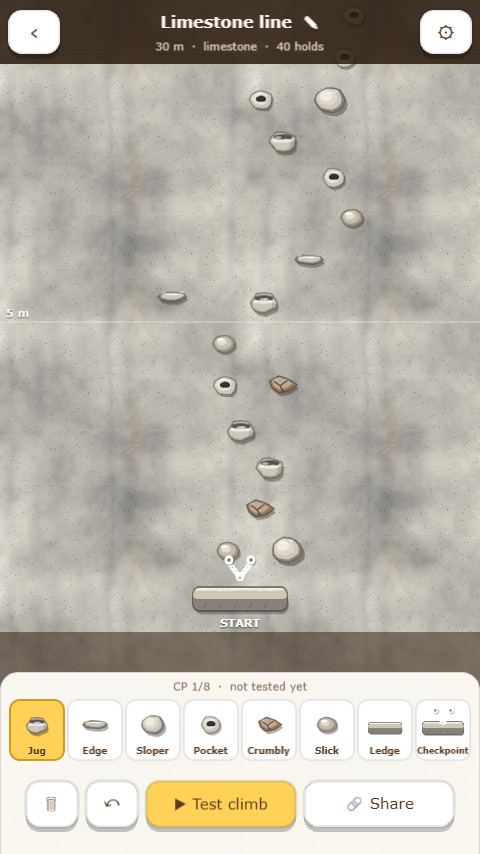
The 🧱 button at the top right of the menu opens Walls: build your own cliff, climb it, then share its code. Tap + New wall to open the editor. The wall is shown at full size with the same rock you will climb.
- Pick a hold type in the bottom palette (jug, edge, sloper, pocket, crumbly, slick, rest ledge, or checkpoint), then tap the wall to place it. Tap an existing hold to change its type, drag it to move it, and drag the wall to scroll. 🗑 erases, ↶ undoes.
- The green area around the selected hold shows how far a hand can reach without a dyno; the dashed yellow line is the dyno reach. Put the next hold inside it.
- The ⚙ button sets the height (15–60 m) and the rock. 🎲 Random route (easy, medium, hard) makes a route that can surely be climbed, as a starting point to change.
- ▶ Test climb: a new wall can only be shared after you climb it to the top yourself. Every time you change the wall, test it again.
- 🔗 Share gives a 6-letter code (for example K7P2QX) and a link. Friends enter the code in 🧱 → Enter code, or just open the link. They see the wall's name, its creator, and your time, and can try to beat it.
Walls are saved on your device (up to 12) and included in the progress backup. Shared walls are stored on our server and deleted if nobody plays them for a year. Climbing custom walls doesn't count toward the "reach a top" missions. The CrazyGames and itch.io versions can build and climb walls, but without share codes.
23. Settings & progress backup
The ⚙ button in the menu opens the settings:
- Language: Indonesian, English, or Spanish (Español). At first it follows your device language.
- Sound and vibration: the phone buzzes when you grab, jump, get caught by the rope, and at big moments like checkpoints and summits. Browser vibration only works on Android phones.
- Best-run ghost, world ranking, and anonymous stats (counts with no personal data that help us improve the game, see the privacy policy): turn them on or off.
- Fall clips: while you climb, the game records the screen on your device. When you take a big fall or reach the top, the last few seconds are saved as a video you can share with the 🎬 button in the pause menu or on the results screen (to TikTok or WhatsApp, for example). Nothing is sent to our server. Turn it off here if your phone feels slow.
- Notifications: a daily route reminder every day around 7:00, 12:00, 17:00, or 20:00 (tap the time to change it). On iPhone/iPad, notifications only work once the game is installed to the home screen.
- Name for the world ranking. You can replay the tutorial from the Help panel (the ? button).
Progress backup. Your progress is saved only in your device's browser, so it can be lost if the browser data is cleared or you switch phones. Open Settings → Progress backup → Create backup code to get a 12-character code such as ABCD-EFGH-JKLM. Write it down or take a photo. On another phone or browser, open the same menu, enter the code, and tap Restore. Your levels, stars, records, missions, badges, and Style items move there, replacing the progress on that device. Record ghosts are not included. While the code is saved, the backup updates automatically whenever your progress changes. If two devices use the same code and both are played, the game asks which progress to keep. Anyone who knows the code can restore your progress, so keep it private. This feature isn't available in the CrazyGames and itch.io versions.
24. Quick tips
- Always move the lower hand first.
- Rest with two hands on and feet planted before the hard parts.
- Pick jugs when you have a choice, and get past slopers quickly.
- Don't stay on slippery rock or crumbly flakes. Move your hand right away.
- Wait for wind and rain to stop before a dyno or before entering a rock roof.
- The hardest part is often just before a checkpoint. If your strength is low, go back to the checkpoint and try again fresh.